
AI Content System: Why Zapier Fails & Make.com Dominates Auto-Blogging
Introduction: The Ordeal of Linear Automation
I vividly remember staring at my monitor at 11:30 PM on a Tuesday, watching my automation bill jump another $50 for the third time that month. I was trying to build a hands-off publishing engine for my niche sites. I had connected Google Sheets, OpenAI, and WordPress using Zapier. It felt like magic for about two days.
Then, the errors started. A failed API call would break the entire chain. A slightly longer article would trigger a timeout. Before I knew it, I was spending more time fixing broken zaps and paying for “premium tasks” than I was actually writing. If you are trying to build a scalable AI content system and an AI publishing workflow, you have probably started with Zapier. It is what every YouTube guru recommends.
But here is the contrarian truth: Zapier is fundamentally broken for complex, multi-step automated programmatic SEO. It is too linear, too rigid, and aggressively overpriced for bulk content generation. If you want to handle far more content production without increasing workload and free up 10 revenue-generating hours every week, you need to migrate to Make.com for your AI content engine.
Here is exactly why Zapier fails for auto-blogging, and how to build a robust, visual AI article generation workflow in Make that actually works for your AI content strategy.
Who Is This AI Content System Designed For?
This workflow is ideal for:
•Solopreneurs managing niche sites
•SEO freelancers
•AI automation builders
•Affiliate marketers
•Content agencies
•Creators scaling programmatic SEO
If you are publishing more than 5–10 AI-assisted articles weekly, your AI content system architecture matters more than your prompts.
The Fatal Flaw in Most Auto-Blogging Setups: A Problem for Your AI Content
Most people approach automated content entirely wrong. They treat it like a straight line.
They think the process is simply: Take a keyword -> Send to ChatGPT -> Post to WordPress.
I built this exact linear system when I started. It resulted in generic, robotic articles that Google’s Helpful Content update immediately penalized.
High-quality AI auto-blogging is not a straight line. It is a branching tree of logic, essential for a high-performing AI content system.
You need to scrape competitor headings, run separate prompts for the introduction and the body, format the HTML, and generate optimized meta descriptions. You need different paths for “How-To” articles versus “Listicles.”
This requires complex routing, data aggregation, and iterative loops.
Why Zapier Fails at Complex Content Generation for AI Content
Zapier is fantastic if you want to send a Slack message when a Stripe payment clears. It is a simple Point A to Point B connector.
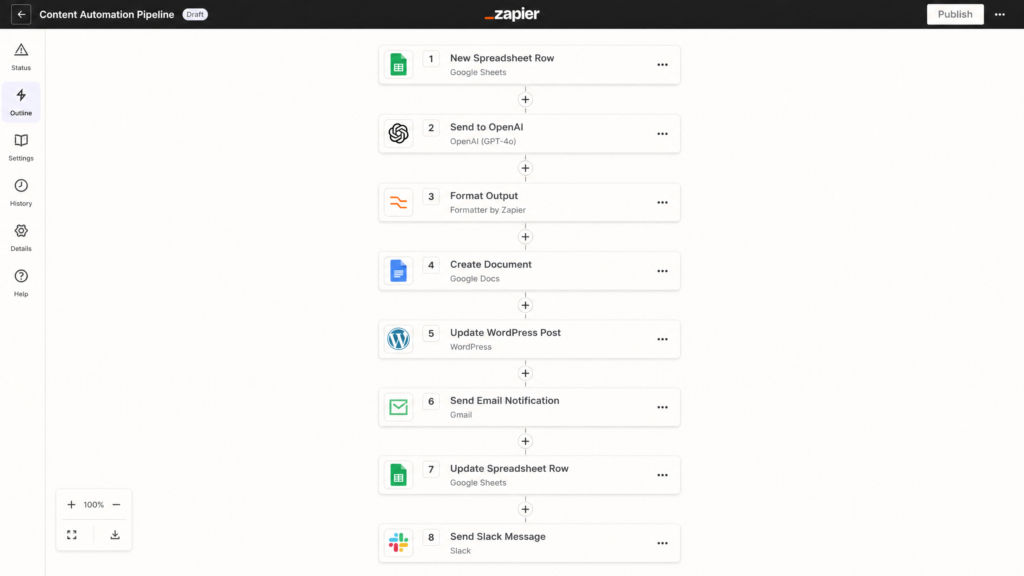
Zapier’s linear, top-to-bottom interface becomes difficult to manage for complex workflows.
But when you try to build an advanced publishing engine for automated blog writing, Zapier’s limitations become painfully obvious.
First, Zapier forces you into a linear, top-to-bottom view. When you have a 15-step content generation workflow, scrolling through a vertical list of text boxes becomes an absolute nightmare to debug.
Second, Zapier’s “Paths” (their version of routers) are heavily restricted and locked behind expensive pricing tiers.
If you want the deep mathematical breakdown of why Zapier is killing your cashflow (and why Make is safer), you need to look at how they charge per task. Zapier charges you for every single step in a sequence. When you are iterating through arrays of text to build a 2,000-word article, you will burn through your monthly quota in a weekend.
Make.com vs Zapier: The Auto-Blogging Showdown for Your AI Content
Make.com (formerly Integromat) operates on a completely different philosophy. It is a visual canvas where you can drag, drop, and branch your logic infinitely.
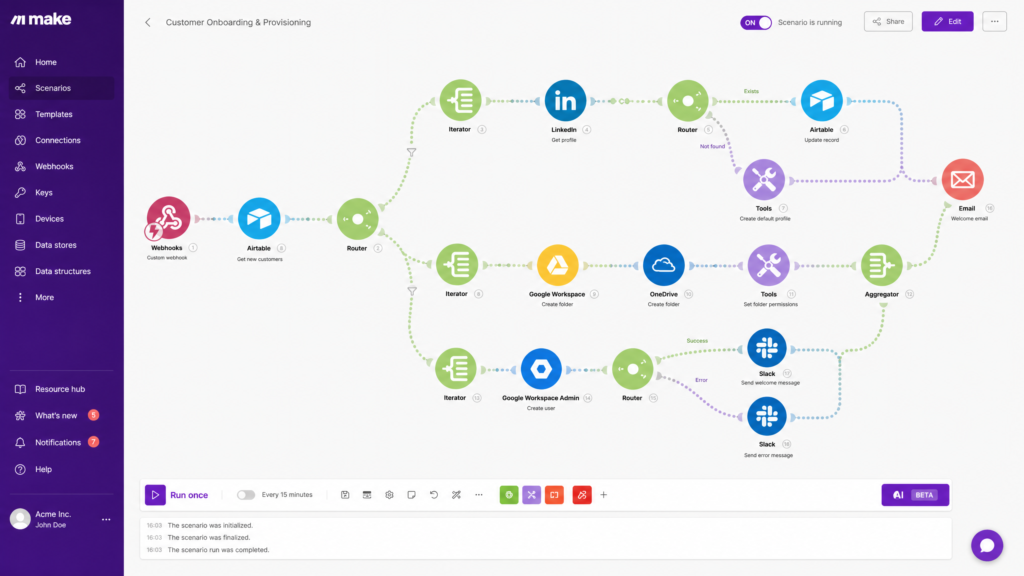
Make.com offers an infinite 2D canvas allowing for complex routing and visual debugging.
Here is how the two platforms stack up when specifically building automated publishing systems.
| Feature | Zapier | Make.com |
| Visual Interface | Linear, top-to-bottom list. Hard to visualize. | Infinite 2D canvas. Drag-and-drop nodes. |
| Routing & Branches | Limited to 3-5 paths. Locked on premium tiers. | Unlimited routing. Included on all tiers. |
| Cost for Bulk Tasks | Extremely high. ~2¢ to 5¢ per task. | Incredibly cheap. ~0.1¢ per operation. |
| Error Handling | Basic. Workflow stops entirely on failure. | Advanced. Can build “ignore” or “retry” routes. |
| Best Used For | Simple 2-step triggers (e.g., Email to CRM). | Complex, multi-step business systems. |
For a solo operator trying to scale a media property, Make.com is the only logical choice.
The Real Cost Difference Nobody Talks About for AI Content
Most beginners compare monthly subscription prices. That is the wrong metric. The real cost comes from task architecture inefficiency.
Here is a simplified example:
| Workflow Action | Zapier Tasks | Make Operations |
| Generate outline | 3 tasks | 1 operation |
| Iterate 7 headings | 21 tasks | 7 operations |
| Aggregate content | 5 tasks | 1 operation |
| Push to WordPress | 4 tasks | 1 operation |
A single 2,000-word AI article can easily consume:
•80–150 Zapier tasks
•15–30 Make operations
At scale, the pricing difference becomes absurd. Publishing 100 AI-assisted articles monthly might cost:
•$200–500/month in Zapier
•$10–40/month in Make.com
This is why serious automation builders eventually abandon linear systems.
Visualizing the Ultimate No-Code Workflow for AI Content
To understand why Make dominates, you need to see what a proper workflow looks like. Instead of a straight line, we use a “Router” to split our workflow based on the type of content we are generating.
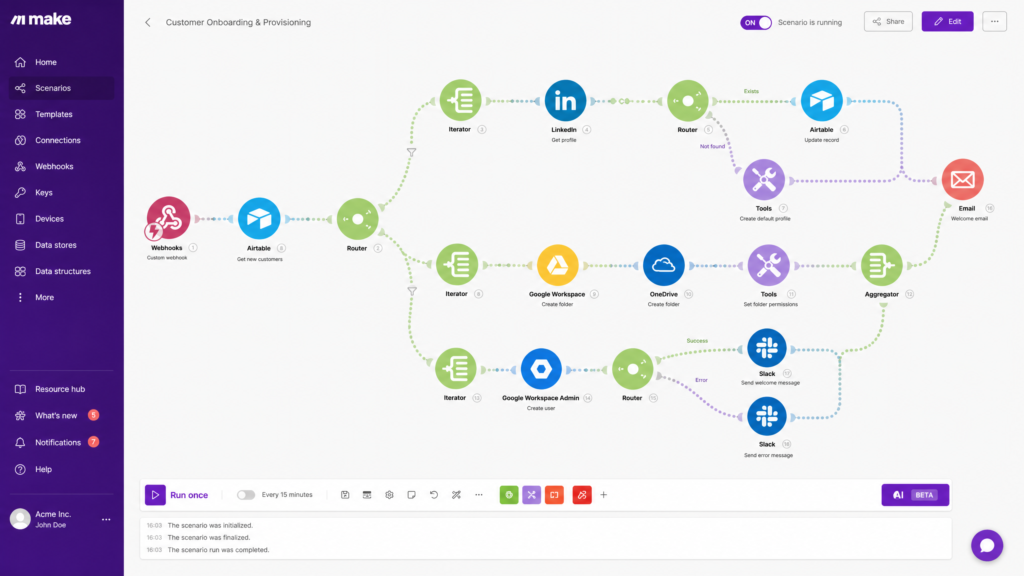
A visual representation of a branching logic workflow using Make.com.
This visual setup allows you to see exactly where your data is flowing. If the comparison table fails, you can visually isolate that specific node without tearing down the whole system.
Step-by-Step: How to Build Your AI Content Publishing Engine
Building this requires a shift in how you think about data. You are no longer a writer; you are a systems architect.
Before you connect the dots, make sure you understand the 10 essential Make.com modules every non-coder needs. You will rely heavily on Routers, Iterators, and Text Aggregators for your AI content system.
Step 1: The Database Trigger
Never use a spreadsheet as your trigger. Google Sheets is prone to formatting errors. Use Airtable. Set up a view called “Ready for AI.” When you drop a keyword and a primary intent tag into this view, Make.com watches for the new record and triggers the workflow.
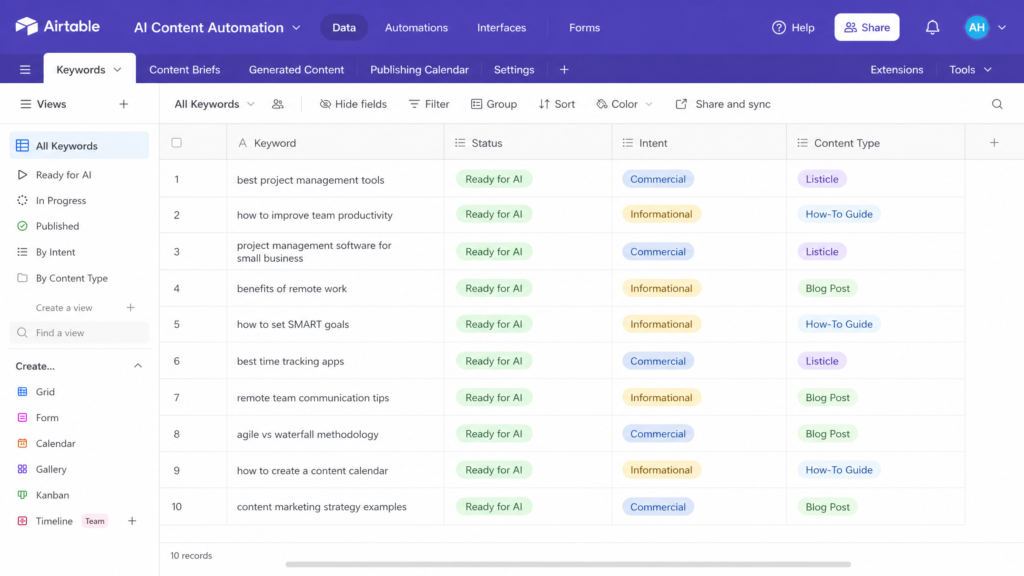
Using Airtable as a robust database trigger instead of fragile spreadsheets.
Step 2: The Outline Generation
Do not ask OpenAI to write a 1,500-word article in one prompt. It will sound like generic fluff. Instead, pass your keyword to an OpenAI module and ask it to generate a JSON array of 5-7 subheadings.
Step 3: The Iterator and Aggregator
This is where Make.com flexes its muscles. You pass that JSON array into an “Iterator” module. Make will then loop through each individual subheading, sending them one by one to a new OpenAI prompt to write the specific paragraph.
Once all paragraphs are written, a “Text Aggregator” module stitches them back together into a single, cohesive article. Zapier simply cannot do this cleanly without massive headaches.
Step 4: The Draft Push
Finally, map your aggregated text, your generated title, and your meta description into the WordPress module. Set the status to “Draft”—never “Publish.”
You also need a strategy before you turn this machine on. Don’t just spam the internet with random keywords. Build a calculated content calendar to structure your publishing velocity and ensure topical authority. For advanced content strategies, explore our resources on SEO content planning.
The “Human-in-the-Loop” Rule for AI Content
Here is an opinion that will make automation purists angry: 100% hands-off auto-blogging is digital pollution.
If you are publishing directly to your live site without looking at the output, you are going to destroy your brand’s credibility. AI hallucinates. It repeats itself. It uses phrases like “delve into” and “in today’s fast-paced digital landscape.”
The most successful automated systems are actually semi-automated.
I always build a “Human-in-the-Loop” step. My Make.com workflow pushes the final article to a WordPress draft, and then sends a Slack message to me with a preview link.
I spend 10 minutes injecting personal anecdotes, fixing robotic phrasing, and adding real-world failure stories (just like the ones in this article). This hybrid approach gives you the volume of AI with the trust and EEAT (Experience, Expertise, Authoritativeness, Trustworthiness) of a human expert.
5 Reasons Most AI Content Systems Collapse
Most automation workflows fail within 30 days because builders ignore operational reliability. Here are the biggest failure points:
1.Prompt Drift: Over time, AI outputs become repetitive and generic unless prompts are updated regularly.
2.API Failures: One timeout from OpenAI can break an entire publishing chain without proper retry logic.
3.No Human QA: Fully automated publishing eventually creates factual errors or embarrassing hallucinations.
4.Weak Topic Clustering: Random keyword generation creates scattered topical authority instead of content silos.
5.Scaling Before Optimization: Most creators automate too early before validating search intent and monetization.
A good AI content system is not just automated. It is resilient.
Targeted FAQs for AI Content Automation Builders
What is the cheapest AI automation stack for beginners?
The most cost-effective stack is Airtable (Free tier for database), Make.com (Core tier at $9/month), and the OpenAI API (pay-per-usage, usually pennies per article). Avoid Zapier and premium AI writing wrappers that charge $99/month for what you can build yourself.
How do I prevent AI hallucinations in automated blog posts?
You must restrict the AI’s creativity in your system prompts. Use multi-step prompts where Step 1 gathers factual data (or uses a web scraping module to pull live SERP data), and Step 2 strictly formats that exact data into paragraphs. Never let the AI “guess” facts.
Can Make.com handle WordPress custom fields for SEO plugins?
Yes. Unlike Zapier’s basic WordPress integration, Make.com allows you to make custom API calls. You can map your generated meta descriptions directly into RankMath or Yoast custom fields using Make’s advanced HTTP modules.
What About n8n for Advanced AI Content?
Some advanced builders eventually outgrow both Zapier and Make.com. That is where n8n enters the picture.
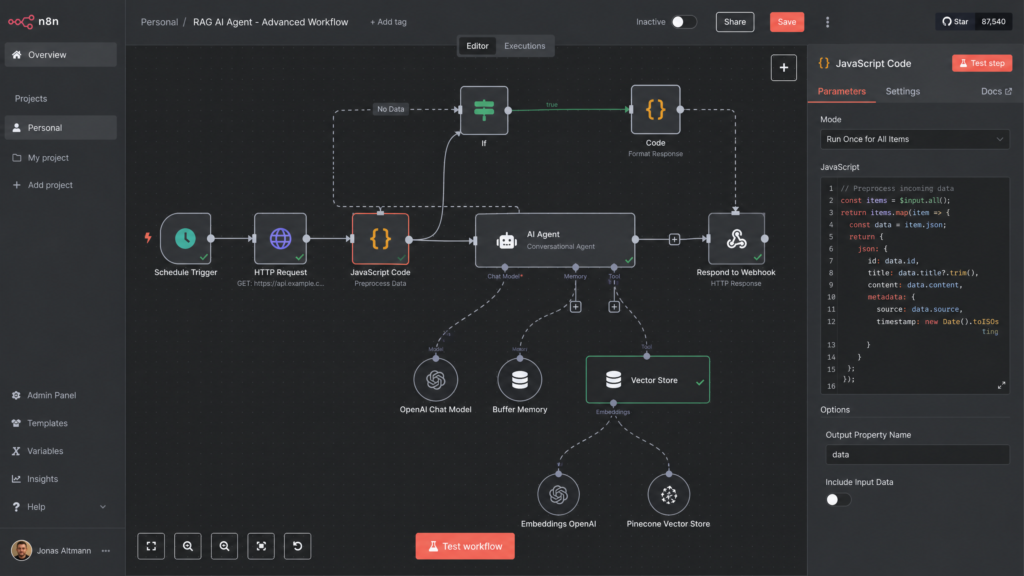
Comparing n8n, Make, and Zapier for advanced automation needs.
Unlike Zapier or Make, n8n can be self-hosted and gives you deeper control over:
•AI agents
•Memory systems
•Vector databases
•Custom JavaScript logic
•LangChain integrations
However, n8n has a steeper learning curve. For most solo operators:
•Zapier = too limited
•Make.com = best balance
•n8n = ultimate flexibility
Your ideal platform depends on whether you prioritize simplicity, scalability, or full system ownership.
The Best AI Content System for Solopreneurs in 2026
Transitioning from manual writing to an automated workflow is a massive leap for any solo business.
But if you build that foundation on a rigid, expensive platform, you will eventually hit a wall. I wasted months fighting with linear zaps and paying overage fees before I realized the platform was the problem.
Make.com gives you the visual freedom, the complex routing, and the cost-efficiency required to build a true AI content system and a no-code AI system. It allows you to stop acting like a copy-paste robot and start acting like a media director. To learn more about the benefits of Make.com, check out our detailed guide on automation with Make.com.
Start small. Build a workflow that just generates outlines first. Once you trust the visual routing, add the drafting and CMS integration.
The creators winning with AI are not publishing faster. They are building operational systems that compound output while reducing decision fatigue.
References
•Solo AI Workflows – Make.com Category
•Solo AI Workflows – Google Sheets + ChatGPT Automation with Make.com