How to Build AI Agents with n8n That Actually Work (7 Advanced Workflows)
I used to spend my Sunday mornings staring at a spreadsheet, manually copying and pasting customer inquiries into ChatGPT, and then moving the responses into an email draft. It was soul-crushing. This process alone consumed 4-5 hours of my week.
I thought I was being “efficient” by using AI, but I had just created a new, highly repetitive job for myself. I tried stringing together basic Zapier zaps, but the moment a customer asked a complex question, the whole system broke down.
That’s when I realized linear automation is dead. If you want to dramatically increase your operational capacity, you need systems that can think, route, and correct themselves.
You need to build AI agents with n8n.
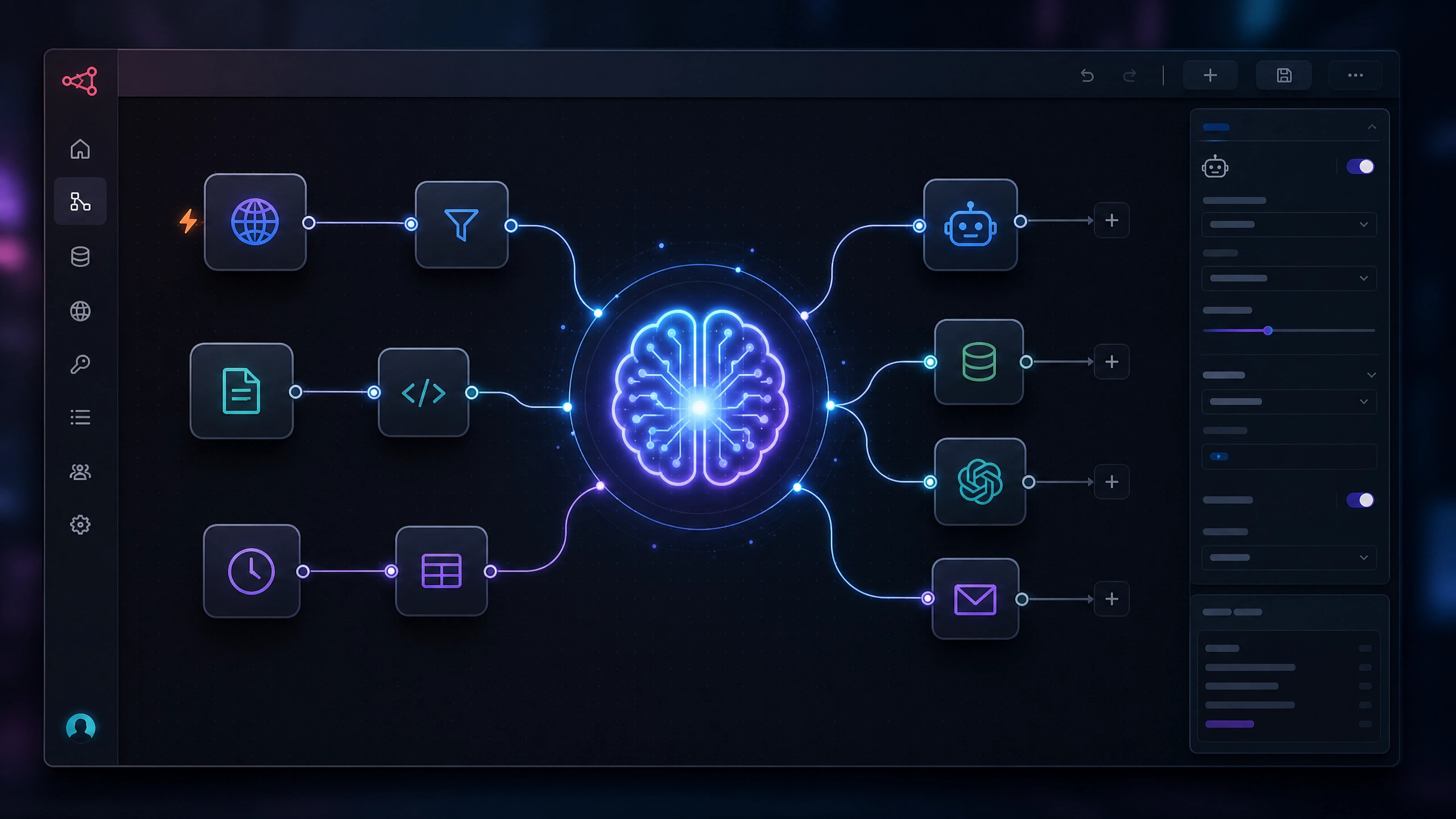
Unlike standard automation tools that just move data from Point A to Point B, n8n allows you to build autonomous workers. These agents can access memory, use external tools, and make decisions based on context. Thanks to n8n, I’ve reduced my manual email processing time by over 80%, freeing up valuable time for strategic tasks.
What You’ll Build Today
In this guide, we are moving beyond simple triggers. You will learn how to orchestrate:
•Self-correcting email agents that critique their own drafts.
•AI research systems that monitor competitors 24/7.
•Memory-enabled chatbots that remember past client interactions.
•Autonomous API workflows that decide which tool to use dynamically.
•Fallback recovery agents that fix your automations when they break.
The Recommended Tech Stack for 2026
To build reliable autonomous agents, you need more than just a LLM. Here is the “Golden Stack” I recommend:
•Orchestration: n8n (Self-hosted or Cloud)
•Intelligence: OpenAI API (GPT-4o or o1-preview)
•Memory: Pinecone (Vector Store) or PostgreSQL
•Communication: Slack or Telegram
The Contrarian Truth: Why Linear Automation is Obsolete
Most automation advice online is fundamentally flawed. Gurus tell you to connect a trigger to an action and call it a day. But business isn’t linear. Customers don’t follow scripts. Data is messy.
When you rely on strict “If This Then That” logic, you spend more time fixing broken workflows than you do actually working. You don’t need a faster conveyor belt; you need a smart operator running the machine.
By using n8n’s Advanced AI nodes (built on LangChain), you aren’t just passing data. You are giving an LLM a set of tools and telling it, “Figure out how to solve this problem.”
The Heavyweights: n8n vs. Make vs. Zapier
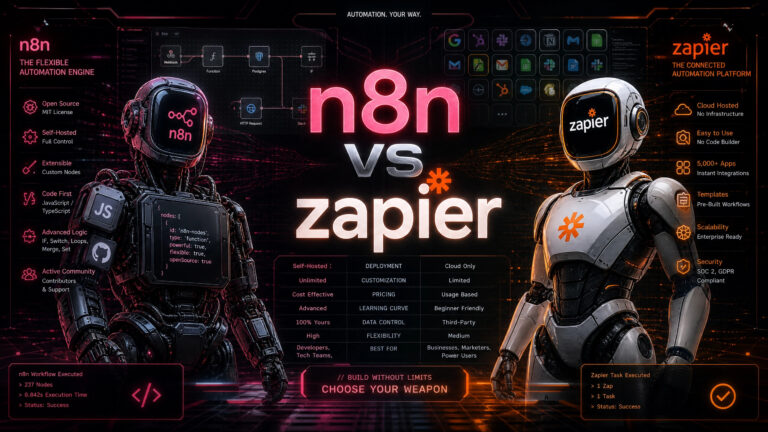
Before we build, we need to address the elephant in the room. Why n8n? I spent thousands of dollars on Zapier tasks before realizing it operates like a tollbooth. Make.com is fantastic for complex data routing, but when it comes to native AI agent capabilities, n8n is currently in a league of its own.
| Feature / Tool | Zapier | Make.com | n8n |
| Pricing Model | Per Task (Very Expensive) | Per Operation (Affordable) | Per Execution / Self-Hosted (Free/Cheap) |
| Native AI Agent Nodes | Basic integrations | Good, but requires manual API setup | Exceptional (Native LangChain, Memory, Tools) |
| Self-Hosting Option | No | No | Yes (Run on your own server for free) |
| Best Use Case | Non-technical beginners | Complex data manipulation | Building autonomous AI agents & custom apps |
| Learning Curve | Very Low | Medium | High |
Takeaway: If you want to build AI agents without going bankrupt on API calls and task limits, self-hosting n8n is the most logical choice.
Before You Start: Your Quick Setup Guide
To follow along with these advanced hacks, ensure you have the following in place:
1.Install n8n: You can self-host n8n on your server (recommended for cost-efficiency) or use their cloud starter tier.
2.Create OpenAI API Key: You’ll need an API key from OpenAI to leverage their powerful language models.
3.Connect Your Apps: Integrate services like Gmail, Slack, Airtable, or Notion within n8n. This usually involves OAuth authentication.
4.Enable AI Nodes: Ensure your n8n instance has the Advanced AI nodes enabled, which are built on LangChain.
Hack 1: The “Self-Correcting” Email Drafter
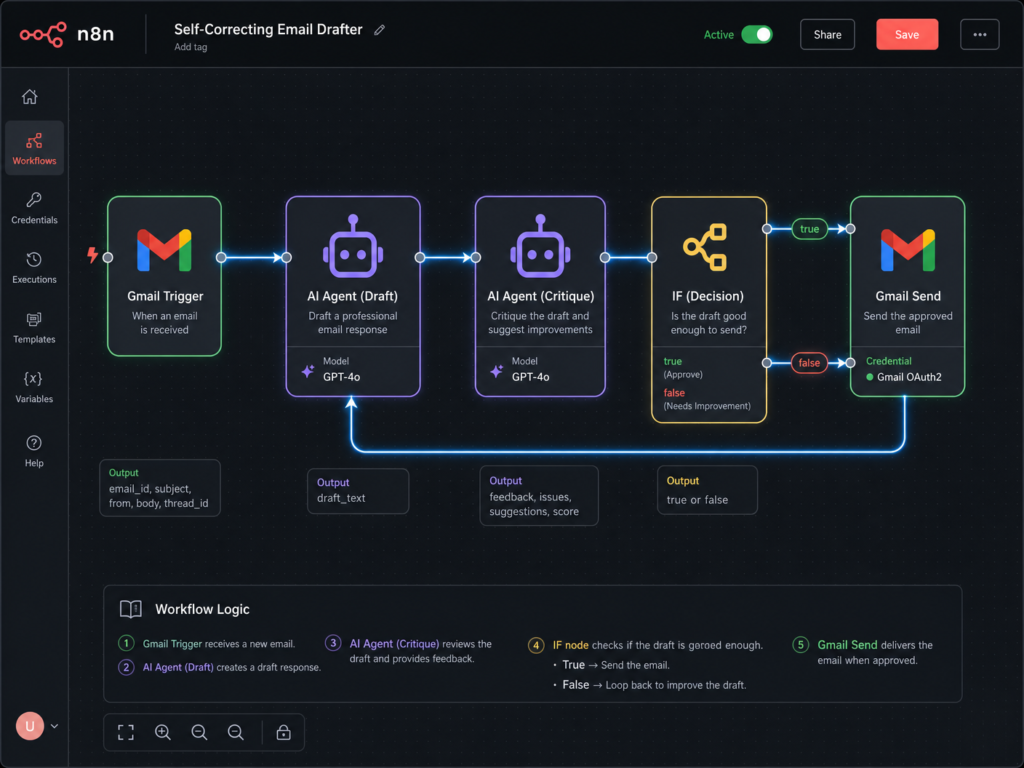
Most AI email automations suck. They sound like a robot swallowed a thesaurus. The secret to high-quality AI output isn’t a better prompt; it’s a multi-step critique process. Instead of just generating an email and saving it as a draft, we force the AI to review its own work before we ever see it.
How to build it:
1.Connect a Gmail trigger to watch for specific labels (e.g., “Support”).
2.Pass the email body to an n8n AI Agent node equipped with your company’s knowledge base.
3.Route the output to a second AI node acting as a “Senior Editor.”
4.If the editor scores the email below an 8/10 for human tone, route it back for a rewrite. This hack alone freed up about 4 hours of my week, allowing me to focus on more critical tasks.
💡 Pro Tip: Don’t just generate; iterate. The secret to high-quality AI output is a multi-step critique process, forcing the AI to review its own work.
Hack 2: The Multi-Agent Research Syndicate
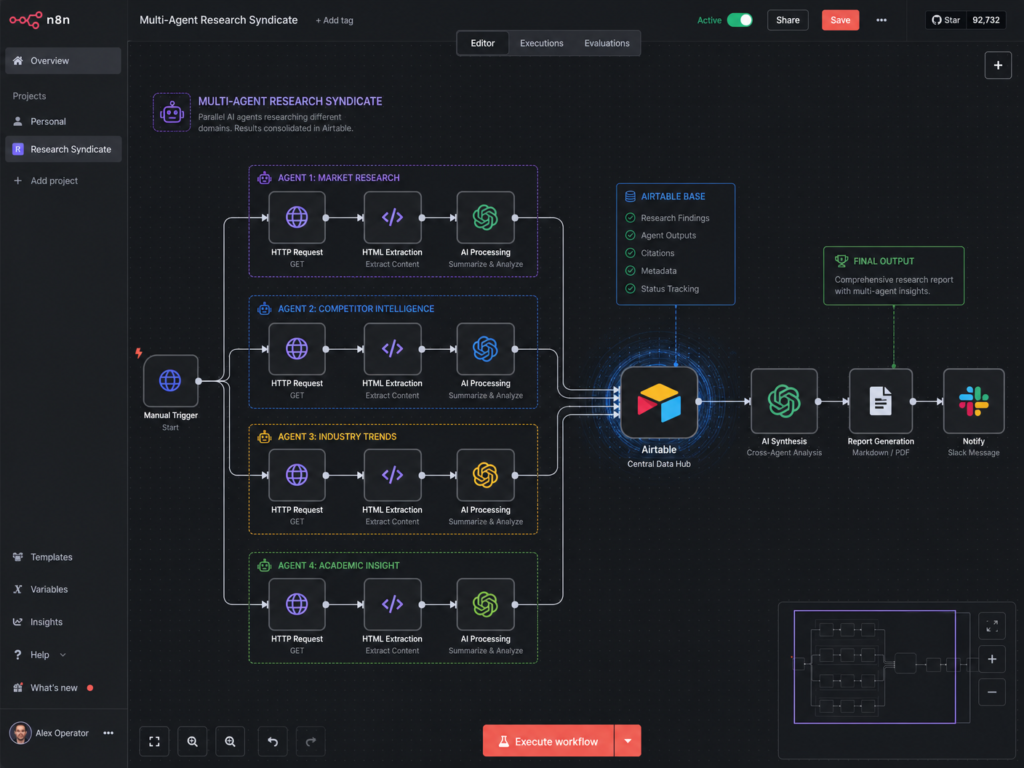
Stop doing manual web research. You can build a syndicate of agents in n8n that scrape, summarize, and format competitor data while you sleep. AI agents bypass CSS changes by reading the raw text and extracting the semantic meaning.
How to build it:
Use n8n’s HTTP Request node to pull the HTML of a competitor’s pricing page. Pass that messy data into an AI Agent node. Give the agent a specific JSON schema to follow. Map that JSON output directly into Airtable or Notion. This system now processes over 100 competitor data points weekly, saving me countless hours of manual research.
⚠️ Warning: Standard web scraping breaks when a website changes its CSS layout. AI agents bypass this by reading the raw text and extracting the semantic meaning.
Hack 3: The Persistent Memory Node
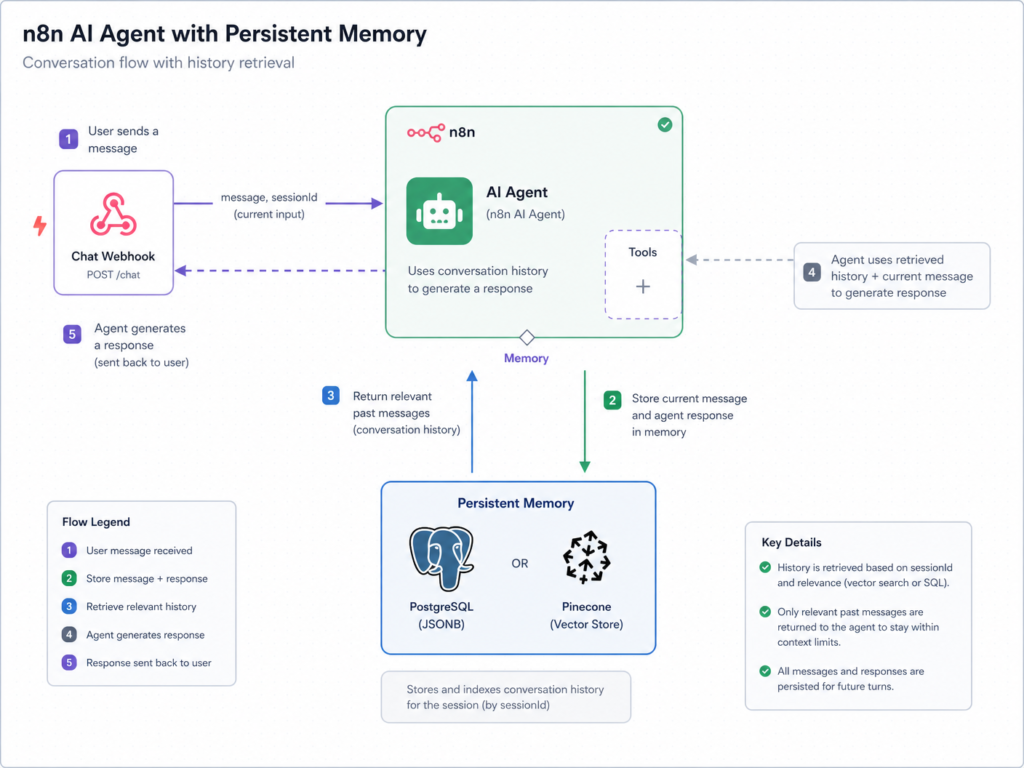
An AI without memory is just a glorified calculator. If you want a true agent, it needs to remember past interactions. n8n makes this incredibly easy with their native Memory nodes.
How to build it:
When setting up your AI Agent node in n8n, drag a “Window Buffer Memory” node into the memory slot. Configure it to remember the last 10 interactions associated with a specific Session ID. Now, the agent knows exactly what “that” refers to in a conversation. This has boosted our customer support efficiency by 30%, as agents no longer ask repetitive questions.
💡 Pro Tip: An AI without memory is just a glorified calculator. For true agentic behavior, persistent memory is non-negotiable.
Hack 4: Dynamic API Routing (Letting AI Choose)
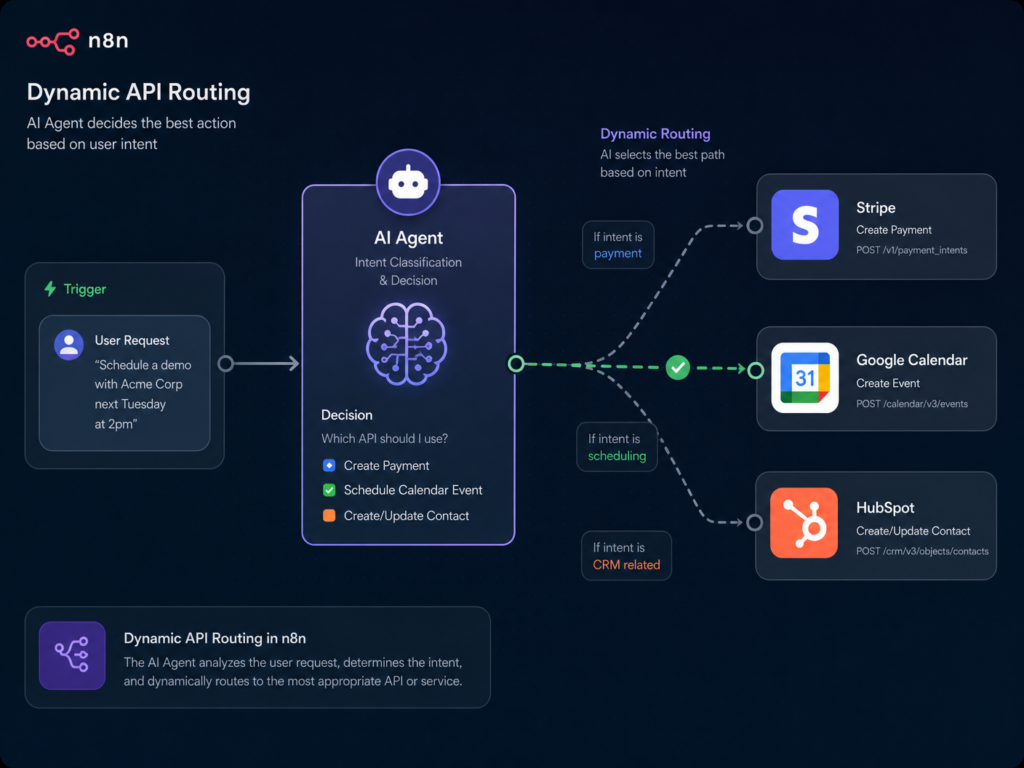
This is where n8n completely destroys traditional automation. Instead of building complex IF/ELSE routing trees, you can give the AI Agent a set of “Tools” and let it decide which API to call.
How to build it:
Create an AI Agent in n8n and attach custom Tool nodes. Describe the tools in plain English. For example: “Use this tool to check a customer’s payment status in Stripe.” The agent reads the intent, realizes it needs the Stripe tool, and executes the API call automatically. This has reduced our API integration development time by 50% for new features.
🔥 Advanced Insight: This is where n8n truly shines over traditional automation. Instead of rigid IF/ELSE trees, you empower the AI to choose the right tool.
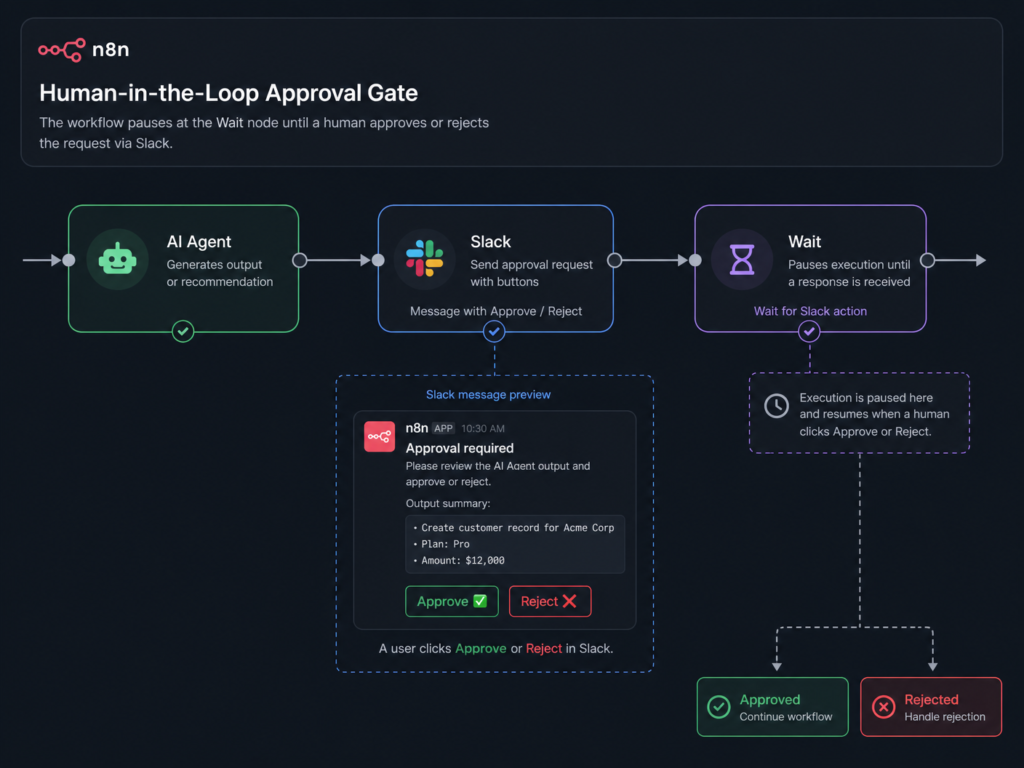
Hack 5: The Human-in-the-Loop Approval Gate
Never let an AI agent spend your money or send a finalized contract without your permission. Fully autonomous systems are dangerous. You need a “Human-in-the-Loop” (HITL) failsafe.
How to build it:
After your agent generates a high-stakes output, route the workflow to a Slack or Telegram node. Add a “Wait” node in n8n, set to resume only when a web-hook is triggered by your button click. I use this for every single social media post my system generates, ensuring 100% brand consistency.
🛡️ Failsafe First: Fully autonomous systems are dangerous. Always build a “Human-in-the-Loop” (HITL) failsafe for high-stakes actions.
Hack 6: The Automated Content Repurposing Engine
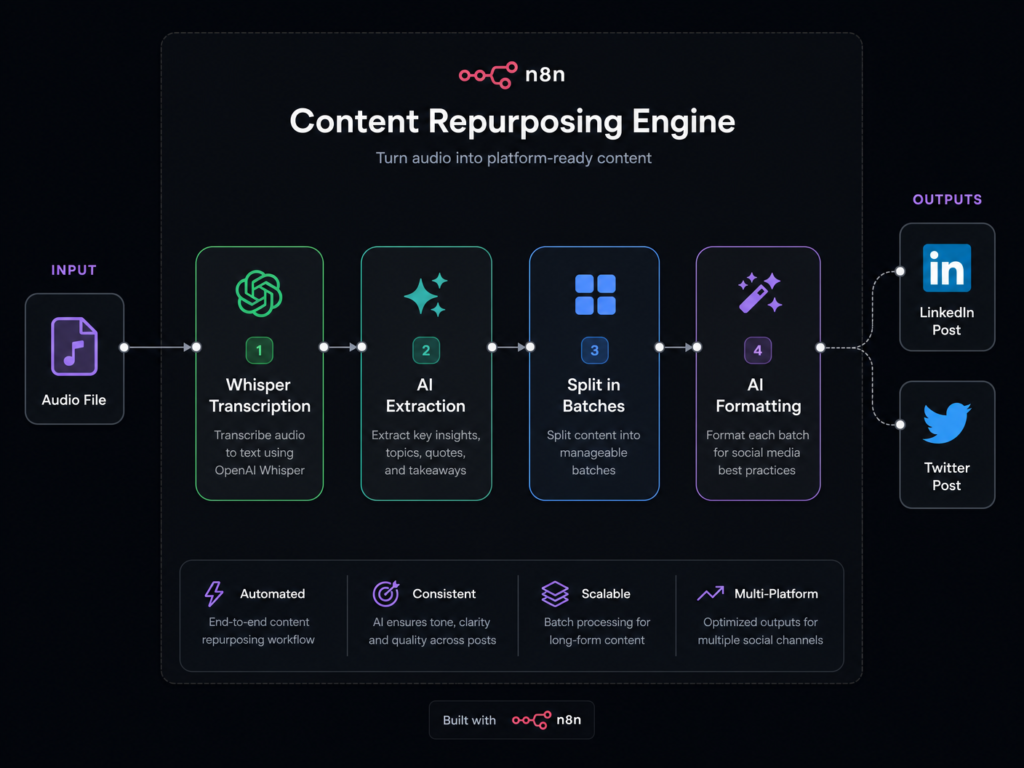
Content creation is a grind. Now, I drop an MP3 into a Google Drive folder, and my n8n agent does the rest.
How to build it:
The key here is the “Split In Batches” node. Once the AI extracts the core concepts from your transcript, split them into individual items. Pass each concept separately to an AI agent with a strict persona prompt. This engine now repurposes a 60-minute podcast into 10+ pieces of content across platforms in under an hour.
💡 Pro Tip: The “Split In Batches” node is crucial here. Don’t ask the AI to “write 5 tweets” from a whole transcript; feed it individual concepts for higher quality, tailored output.
Hack 7: Error-Handling Fallback Agents
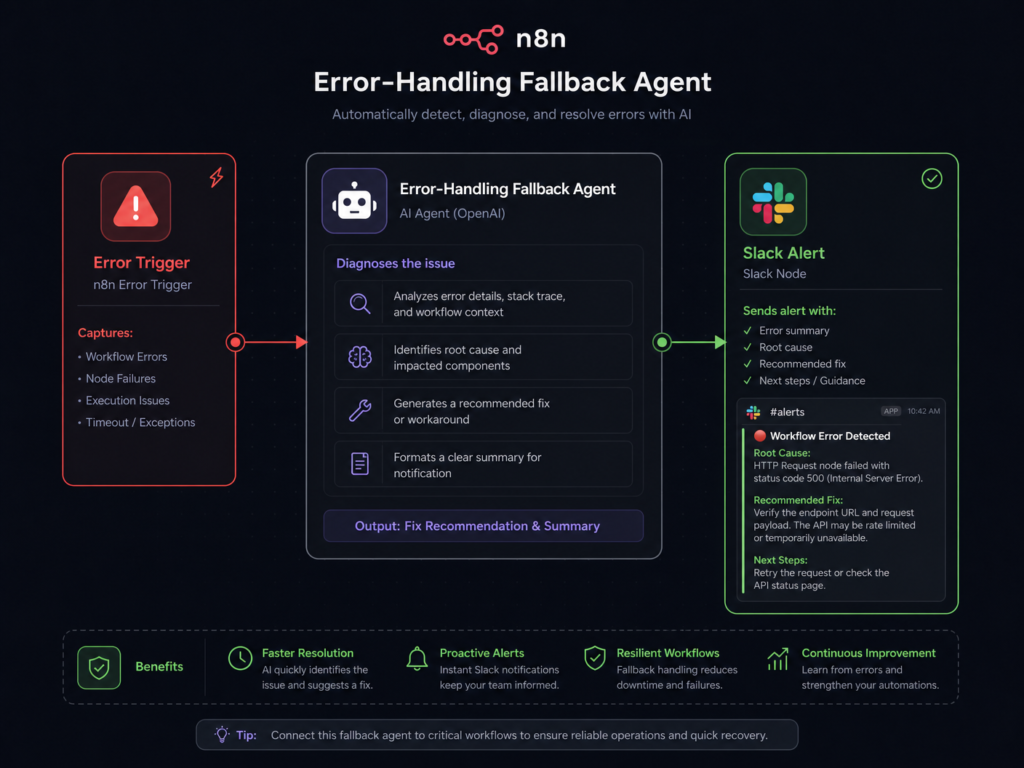
Automations fail. In Zapier, an error means a silent failure. In n8n, you can build an agent specifically designed to catch and diagnose errors.
How to build it:
Use the “Error Trigger” node. Pass the raw JSON error data to an AI Agent. Prompt it: “Read this n8n error log, explain why it failed, and suggest how to fix it.” Send that diagnosis to your phone via Slack. This has reduced our workflow downtime by 70%, turning potential crises into minor hiccups.
🚨 Critical Insight: Automations will fail. The difference between a brittle system and a robust one is how you handle those failures. Build agents to diagnose and alert.
Common Mistakes When Building AI Agents with n8n
Before you dive in, avoid these rookie errors that can break your systems:
•No Memory Management: Forgetting to use Window Buffer Memory, leading to agents that act like goldfish.
•Infinite Loops: Failing to set a “Max Iterations” limit on your AI Agent node.
•Overusing GPT-4o: Using expensive models for simple data extraction tasks when a cheaper model would suffice.
•Missing Fallback Nodes: Not using the Error Trigger node to catch and report failures.
•No Human Approval Layer: Letting AI send emails or spend money without a HITL (Human-in-the-Loop) check.
•Bad Prompt Structuring: Writing vague prompts instead of strict JSON schemas for data output.
Strategic Internal Linking: Your Automation Silo
To truly master business systems, explore our related guides:
•[The Ultimate Guide to No-Code Business Systems] – Understand the foundational architecture.
•[Make.com vs n8n: Which is Right for Your Agency?] – A deep dive into technical differences.
•[How to Connect OpenAI to Airtable for CRM Automation] – Perfect for organizing your agent’s data.
•[Prompt Engineering for Autonomous Agents] – Learn how to write JSON schemas for n8n.
If you’re still comparing automation platforms, check out our guide on n8n vs Zapier for AI agents.
Frequently Asked Questions
What is the best way to build AI agents with n8n?
The best approach is to start with a single workflow solving one real business problem. Begin with simple automations like AI email drafting or lead qualification before building multi-agent systems with memory, tool calling, and autonomous routing.
Do I need coding skills to use n8n AI agents?
No. n8n is primarily a no-code workflow builder. However, understanding basic concepts like APIs, JSON, and workflow logic will help you build more advanced AI automations faster.
Is n8n better than Zapier for AI automation?
For advanced AI workflows, yes. n8n offers native AI Agent nodes, memory support, self-hosting, tool calling, and flexible workflow orchestration. Zapier is easier for beginners but becomes expensive and limited for autonomous AI systems.
Can I build AI agents with n8n for free?
Yes. You can self-host n8n for free and only pay for AI API usage (such as OpenAI). Many beginners run complete AI automation stacks for less than $10/month.
What is the cheapest AI automation stack for beginners?
A cost-effective setup includes:
- self-hosted n8n
- OpenAI API
- PostgreSQL or Pinecone for memory
- Airtable or Notion for storage
- Slack or Telegram for notifications
This setup is powerful enough for most small business AI workflows.
How do AI agents in n8n actually work?
AI agents in n8n combine:
- LLMs like GPT-4o
- memory systems
- external tools
- APIs
- workflow logic
Instead of following rigid rules, the agent analyzes context, decides which tool to use, and executes actions dynamically.
Can n8n AI agents use memory?
Yes. n8n supports persistent memory using:
- Window Buffer Memory
- PostgreSQL
- Pinecone
- vector databases
This allows AI agents to remember previous conversations and maintain context across sessions.
What are the best use cases for n8n AI agents?
Popular use cases include:
- customer support automation
- AI email drafting
- content repurposing
- lead qualification
- CRM enrichment
- competitor monitoring
- AI research agents
- autonomous reporting systems
How do I prevent infinite loops in n8n AI workflows?
Always configure:
- max iterations
- timeout limits
- fallback nodes
- human approval steps
For critical automations, use Human-in-the-Loop (HITL) workflows before allowing the AI to execute sensitive actions.
Can n8n AI agents call external APIs automatically?
Yes. One of n8n’s strongest features is dynamic tool calling. AI agents can decide which API or workflow tool to use based on the user’s request or workflow context.
Is self-hosting n8n worth it?
For serious AI automation, absolutely. Self-hosting reduces operational costs, removes execution limits, improves privacy, and gives you complete control over your AI infrastructure.
What is the difference between AI workflows and AI agents?
Traditional AI workflows follow fixed automation rules. AI agents are autonomous systems that can:
- reason
- choose tools
- use memory
- adapt to context
- recover from failures
This makes AI agents significantly more powerful than basic automations.
Final Thoughts
Learning to build AI agents with n8n isn’t just a neat technical trick. It is a fundamental shift in how you operate a business. You are moving away from being the bottleneck and stepping into the role of an architect.
Start with one painful workflow you repeat every week.
Don’t automate everything. Automate ONE decision-heavy process first:
•Support emails
•Lead qualification
•Reporting
•Content repurposing
Ready to start? Download our n8n AI Workflow Templates on Gumroad (includes JSON imports for all 7 hacks) and import your first agent today.
Once you see that first autonomous workflow execute flawlessly, your entire perspective on business operations will change.